前言
说实话,在写这篇博文前我对acme脚本也只是停留在“小白”阶段,真正各种应用申请模式一窍不通。在网站域名续签SSL证书和科学上网搭建HTTPS安全通道时,学好acme脚本太重要了!本文以最全最简单通俗易懂的语言描述acme各种申请场景的应用,如果你只对一种最热门最简单快速申请感兴趣,可以直接点击“DNS API模式”应用。如果你希望系统学习,建议看完整篇文章领悟后再也不用到处谷歌了,文章对你有用,不妨点赞转发收藏。
**申请条件:**1,一级域名一个(如:yugogogogo.ml);2:vps一台;
申请目标:多域名单证书,如:二级泛域名单证书(演示域名:*.yugogogogo.ml),即一个证书通用所有域下二级域名。
安装Acme.sh脚本
获取并安装的命令:
cd /root
curl https://get.acme.sh sh -s email=my@example.com
安装失败可能是vps没有安装curl,不会的朋友可以谷歌一下。 安装过程演示如下:
% Total % Received % Xferd Average Speed Time Time Time Current
Dload Upload Total Spent Left Speed
100 937 0 937 0 0 3222 0 –:–:– –:–:– –:–:– 3419
% Total % Received % Xferd Average Speed Time Time Time Current
Dload Upload Total Spent Left Speed
100 205k 100 205k 0 0 839k 0 –:–:– –:–:– –:–:– 840k
[Wed Apr 21 15:11:52 CST 2021] Installing from online archive.
[Wed Apr 21 15:11:52 CST 2021] Downloading https://github.com/acmesh-official/acme.sh/archive/master.tar.gz
[Wed Apr 21 15:11:53 CST 2021] Extracting master.tar.gz
[Wed Apr 21 15:11:53 CST 2021] It is recommended to install socat first.
[Wed Apr 21 15:11:53 CST 2021] We use socat for standalone server if you use standalone mode.
[Wed Apr 21 15:11:53 CST 2021] If you don’t use standalone mode, just ignore this warning.
[Wed Apr 21 15:11:53 CST 2021] Installing to /root/.acme.sh
[Wed Apr 21 15:11:53 CST 2021] Installed to /root/.acme.sh/acme.sh
[Wed Apr 21 15:11:53 CST 2021] Installing alias to ‘/root/.bashrc’
[Wed Apr 21 15:11:53 CST 2021] OK, Close and reopen your terminal to start using acme.sh
[Wed Apr 21 15:11:53 CST 2021] Installing alias to ‘/root/.cshrc’
[Wed Apr 21 15:11:53 CST 2021] Installing alias to ‘/root/.tcshrc’
[Wed Apr 21 15:11:53 CST 2021] Installing cron job
[Wed Apr 21 15:11:53 CST 2021] Good, bash is found, so change the shebang to use bash as preferred.
[Wed Apr 21 15:11:54 CST 2021] OK
[Wed Apr 21 15:11:54 CST 2021] Install success!
在生成证书之前,请先安装依赖程序socat,
#Centos安装命令:
yum -y install socat
#debian
apt install socat
生成证书
在生成证书前,需要验证域名所有权,一旦验证成功即可颁发证书,目前验证方式存在多样性,本文进行科学分类,便于大家理解记忆:
Web服务器验证
这种http验证需要在服务器上安装有Web服务,通常使用最多的是Apache,Nginx组件提供Web服务。 1,若是Nginx服务器,http验证如下:(请把下面的mydomain.com更换为自己的域名再执行)
~/.acme.sh/acme.sh –issue -d mydomain.com –nginx
2,若是Apache服务器,http验证如下:(请把下面的mydomain.com更换为自己的域名再执行)
~/.acme.sh/acme.sh –issue -d mydomain.com –apache
注意, 无论是 apache 还是 nginx 模式, acme.sh在完成验证之后, 会恢复到之前的状态, 都不会私自更改你本身的配置. 好处是你不用担心配置被搞坏, 也有一个缺点, 你需要自己配置 ssl 的配置, 否则只能成功生成证书, 你的网站还是无法访问https. 但是为了安全, 你还是自己手动改配置吧. 3,若是其他web服务器,http 方式需要在你的网站根目录下放置一个文件, 来验证你的域名所有权,完成验证. 然后就可以生成证书了.http验证命令如下:(请把下面的mydomain.com更换为自己的域名再执行)
~/.acme.sh/acme.sh –issue -d mydomain.com -d www.mydomain.com –webroot /home/wwwroot/mydomain.com/
非Web服务器验证
DNS API模式
这是**首选主流方式,理由:1,免安装Web服务验证;2,设置简单,3,到期自动续签。 各主流DNS(CF,DNSPOD,CloudXNS,GoDaddy)** API自动验证命令请点击此处浏览。 这里使用最热门的CF平台演示:
设置代码如下:
#以下填写CF账户的API密匙和自己的账户邮箱,API密匙在账户个人资料API令牌的Global API Key
export CF_Key=”43a02288d910ac45241b679bfed5b17fe3937”
export CF_Email=”yugogo@gmail.com“
#使用以下命令申请证书,注意修改为自己的域名再执行
~/.acme.sh/acme.sh –issue –dns dns_cf -d yugogogogo.ml -d *.yugogogogo.ml
安装过程演示如下:
[Wed Apr 21 15:17:58 CST 2021] Renew: ‘yugogogogo.ml’
[Wed Apr 21 15:17:58 CST 2021] ‘yugogogogo.ml’ is not an issued domain, skip.
[root@107 ~]# ~/.acme.sh/acme.sh –issue –dns dns_cf -d yugogogogo.ml -d *.yugogogogo.ml
[Wed Apr 21 15:23:42 CST 2021] Using CA: https://acme-v02.api.letsencrypt.org/directory
[Wed Apr 21 15:23:42 CST 2021] Create account key ok.
[Wed Apr 21 15:23:43 CST 2021] Registering account: https://acme-v02.api.letsencrypt.org/directory
[Wed Apr 21 15:23:43 CST 2021] Registered
[Wed Apr 21 15:23:43 CST 2021] ACCOUNT_THUMBPRINT=’qPwLs4G_JghvrVtDCUSiIIkVQTa4hHMmmyUR8C3eZVY’
[Wed Apr 21 15:23:43 CST 2021] Creating domain key
[Wed Apr 21 15:23:43 CST 2021] The domain key is here: /root/.acme.sh/yugogogogo.ml/yugogogogo.ml.key
[Wed Apr 21 15:23:43 CST 2021] Multi domain=’DNS:yugogogogo.ml,DNS:*.yugogogogo.ml’
[Wed Apr 21 15:23:43 CST 2021] Getting domain auth token for each domain
[Wed Apr 21 15:23:44 CST 2021] Getting webroot for domain=’yugogogogo.ml’
[Wed Apr 21 15:23:45 CST 2021] Getting webroot for domain=’*.yugogogogo.ml’
[Wed Apr 21 15:23:45 CST 2021] Adding txt value: 1QsyHlz0mjlTKcDgmjfrIs5CwvIEys9D54soKldKPqU for domain: _acme-challenge.yugogogogo.ml
[Wed Apr 21 15:23:46 CST 2021] Adding record
[Wed Apr 21 15:23:46 CST 2021] Added, OK
[Wed Apr 21 15:23:46 CST 2021] The txt record is added: Success.
[Wed Apr 21 15:23:46 CST 2021] Adding txt value: NHsRhnpsiWKLTGpZJZI23CfX2Ztk9KQSsIwCVefGaNo for domain: _acme-challenge.yugogogogo.ml
[Wed Apr 21 15:23:47 CST 2021] Adding record
[Wed Apr 21 15:23:47 CST 2021] Added, OK
[Wed Apr 21 15:23:47 CST 2021] The txt record is added: Success.
[Wed Apr 21 15:23:47 CST 2021] Let’s check each DNS record now. Sleep 20 seconds first.
[Wed Apr 21 15:24:08 CST 2021] You can use ‘–dnssleep’ to disable public dns checks.
[Wed Apr 21 15:24:08 CST 2021] See: https://github.com/acmesh-official/acme.sh/wiki/dnscheck
[Wed Apr 21 15:24:08 CST 2021] Checking yugogogogo.ml for _acme-challenge.yugogogogo.ml
[Wed Apr 21 15:24:09 CST 2021] Domain yugogogogo.ml ‘_acme-challenge.yugogogogo.ml’ success.
[Wed Apr 21 15:24:09 CST 2021] Checking yugogogogo.ml for _acme-challenge.yugogogogo.ml
[Wed Apr 21 15:24:09 CST 2021] Domain yugogogogo.ml ‘_acme-challenge.yugogogogo.ml’ success.
[Wed Apr 21 15:24:09 CST 2021] All success, let’s return
[Wed Apr 21 15:24:09 CST 2021] Verifying: yugogogogo.ml
[Wed Apr 21 15:24:12 CST 2021] Success
[Wed Apr 21 15:24:12 CST 2021] Verifying: *.yugogogogo.ml
[Wed Apr 21 15:24:14 CST 2021] Success
[Wed Apr 21 15:24:14 CST 2021] Removing DNS records.
[Wed Apr 21 15:24:15 CST 2021] Removing txt: 1QsyHlz0mjlTKcDgmjfrIs5CwvIEys9D54soKldKPqU for domain: _acme-challenge.yugogogogo.ml
[Wed Apr 21 15:24:16 CST 2021] Removed: Success
[Wed Apr 21 15:24:16 CST 2021] Removing txt: NHsRhnpsiWKLTGpZJZI23CfX2Ztk9KQSsIwCVefGaNo for domain: _acme-challenge.yugogogogo.ml
[Wed Apr 21 15:24:17 CST 2021] Removed: Success
[Wed Apr 21 15:24:17 CST 2021] Verify finished, start to sign.
[Wed Apr 21 15:24:17 CST 2021] Lets finalize the order.
[Wed Apr 21 15:24:17 CST 2021] Le_OrderFinalize=’https://acme-v02.api.letsencrypt.org/acme/finalize/120112302/9199888471‘
[Wed Apr 21 15:24:18 CST 2021] Downloading cert.
[Wed Apr 21 15:24:18 CST 2021] Le_LinkCert=’https://acme-v02.api.letsencrypt.org/acme/cert/03677bb7ec9522bb7b18baa05ef98ef6a100‘
[Wed Apr 21 15:24:18 CST 2021] Cert success.
—–BEGIN CERTIFICATE—–
MIIFKTCCBBGgAwIBAgISA2d7t+yVIrt7GLqgXvmO9qEAMA0GCSqGSIb3DQEBCwUA
MDIxCzAJBgNVBAYTAlVTMRYwFAYDVQQKEw1MZXQncyBFbmNyeXB0MQswCQYDVQQD
EwJSMzAeFw0yMTA0MjEwNjI0MTdaFw0yMTA3MjAwNjI0MTdaMBUxEzARBgNVBAMT
Cnl1Z29nby54eXowggEiMA0GCSqGSIb3DQEBAQUAA4IBDwAwggEKAoIBAQDwXZE/
v9Urz8NSAB7sPTweetDrR7ZVauGYxG7DOlP1+sghgFWdmfskWp4uNOgpOFqob4Tc
oYnkYve7GRjikvT6SB5QblUGacXmtj/T4PB5B6kfHMbxdh7Vbt9RGsEU+BFoMqEW
74NIKaIIJ6hfjvSltgT5fg3UoV6f+P5VO28jXf9SlS2Af75yJpqkRam464WSeXqI
qC/sm0nWMrlrYMPmlZ2m9Y4suVfsy2fszd99yKbUmAIbhyzm5DIiRBDXSEuh0G/9
xEhiw5sul8kwJVjANSyLoKW9e6hWO0cW6FL/pwz+Ne2xdtwkXF4pGw6bF5DKEZmo
s8DM6wmz42rm0cyHAgMBAAGjggJUMIICUDAOBgNVHQ8BAf8EBAMCBaAwHQYDVR0l
BBYwFAYIKwYBBQUHAwEGCCsGAQUFBwMCMAwGA1UdEwEB/wQCMAAwHQYDVR0OBBYE
FAV0nFcTXyMKZlKFCKZ22oDGYRySMB8GA1UdIwQYMBaAFBQusxe3WFbLrlAJQOYf
r52LFMLGMFUGCCsGAQUFBwEBBEkwRzAhBggrBgEFBQcwAYYVaHR0cDovL3IzLm8u
bGVuY3Iub3JnMCIGCCsGAQUFBzAChhZodHRwOi8vcjMuaS5sZW5jci5vcmcvMCMG
A1UdEQQcMBqCDCoueXVnb2dvLnh5eoIKeXVnb2dvLnh5ejBMBgNVHSAERTBDMAgG
BmeBDAECATA3BgsrBgEEAYLfEwEBATAoMCYGCCsGAQUFBwIBFhpodHRwOi8vY3Bz
BBMflNeJAiEAr/6N5c+LXMQZIgYvApCQXTeXMPKEi7zkOkBa6O/PfXwwDQYJKoZI
hvcNAQELBQADggEBAGq84Td41rIlOBhHWK3jqWEGWlrPSLPlx+vEAXHjkUwRnXHL
8YPEW7CtJTdO8c8BoHRfmA/SkpDkyRSR9fTnIQWBM0N+icIwHcCoT4w1fyRzDnds
a21byU/xRu8+wMG1m5BFt/Mik4x1TjRQ45rBUdwIDTKpzHhvQlkvK12GWuf5nXuC
MmqCC+nejX07DefhrGYhSCMBs7MKOwome0PY1WjVEkS0yHu0Ih6xiZo9zME90UMQ
dNcDPlx1bT9JGLJp8DQWaPKlfNj8MxFhQ2GDLbYTootR4+YpOd+GNI50oQJcSpyZ
aPe5I3N60CLekovFhbErChUK3cVVawSvokrsKzM=
—–END CERTIFICATE—–
[Wed Apr 21 15:24:18 CST 2021] Your cert is in /root/.acme.sh/yugogogogo.ml/yugogogogo.ml.cer
[Wed Apr 21 15:24:18 CST 2021] Your cert key is in /root/.acme.sh/yugogogogo.ml/yugogogogo.ml.key
[Wed Apr 21 15:24:18 CST 2021] The intermediate CA cert is in /root/.acme.sh/yugogogogo.ml/ca.cer
[Wed Apr 21 15:24:18 CST 2021] And the full chain certs is there: /root/.acme.sh/yugogogogo.ml/fullchain.cer
以上就是整个成功获取SSL证书的信息,上面第第72,74行突亮行则显示证书和key存放路径位置。
DNS 手动模式
**手动 dns 方式, 手动在域名上添加一条 txt 解析记录, 验证域名所有权。
**警告:不能自动续签,证书到期依然手动申请,很麻烦,建议使用dns api模式申请,可以自动续签。 这里使用yugogogogo.ml为例演示. 第一步骤:
~/.acme.sh/acme.sh –issue -d yugogogogo.ml –dns –yes-I-know-dns-manual-mode-enough-go-ahead-please
acme.sh会在本地vps为域名自动生成验证信息,如下图信息: 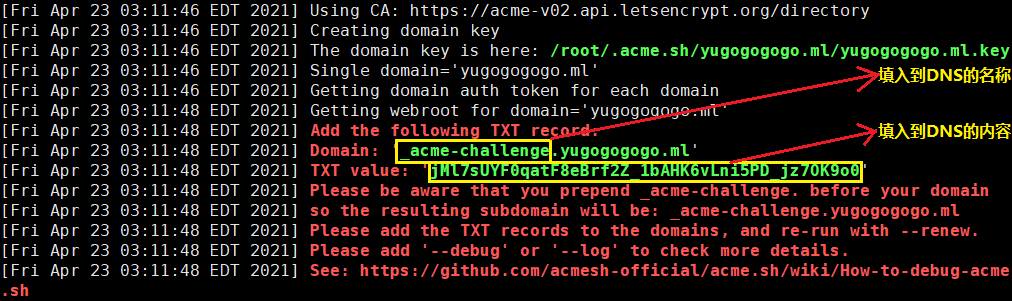 第二步骤:然后到CF平台DNS管理页面,在其yugogogogo.ml域名管理页面,(上图所示:从acme脚本获取TXT验证信息,复制粘贴到DNS添加解析记录相应位置,)
如果解析信息与本地acme.sh生成信息不一致或解析不成功,执行~/.acme.sh/acme.sh --renew -d yugogogogo.ml --yes-I-know-dns-manual-mode-enough-go-ahead-please就会出现下图报错信息,无法获取ssl证书: 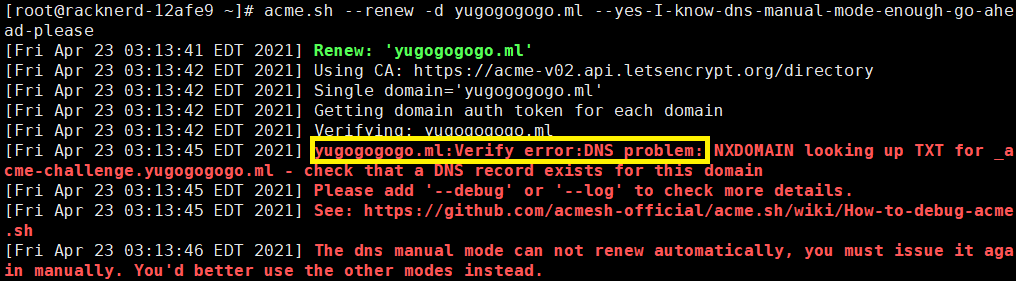 所以,请务必保证配置解析记录信息与acme.sh生成的TXT信息一致。 这里附上DNS管理页面添加记录图示:
 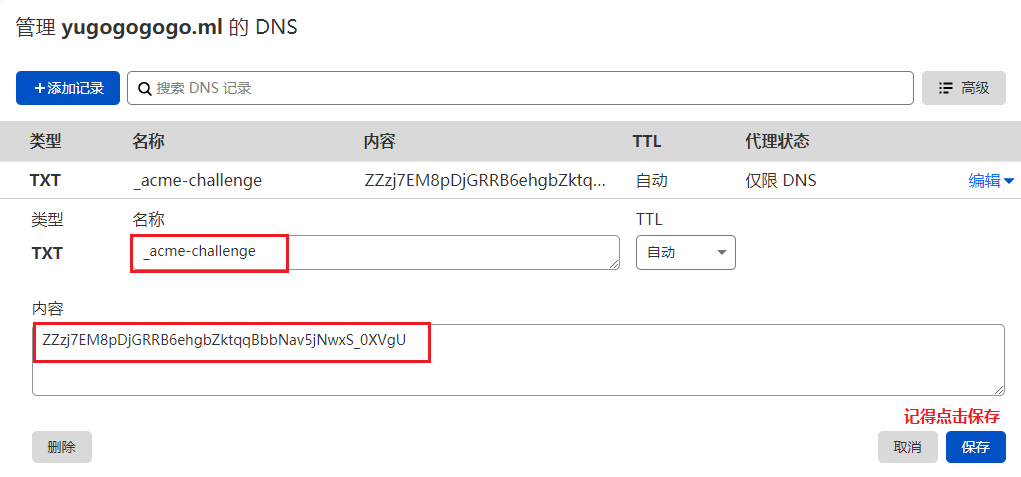 然后回到VPS终端,使用以下命令验证域名解析。
(注意:复制粘贴命令前先修改为自己的域名)
~/.acme.sh/acme.sh –renew -d yugogogogo.ml –yes-I-know-dns-manual-mode-enough-go-ahead-please
安装过程演示如下:
[root@racknerd-12afe9 ~]# acme.sh –renew -d yugogogogo.ml –yes-I-know-dns-manual-mode-enough-go-ahead-please
[Fri Apr 23 03:29:37 EDT 2021] Renew: ‘yugogogogo.ml’
[Fri Apr 23 03:29:37 EDT 2021] Using CA: https://acme-v02.api.letsencrypt.org/directory
[Fri Apr 23 03:29:37 EDT 2021] Single domain=’yugogogogo.ml’
[Fri Apr 23 03:29:38 EDT 2021] Getting domain auth token for each domain
[Fri Apr 23 03:29:39 EDT 2021] Getting webroot for domain=’yugogogogo.ml’
[Fri Apr 23 03:29:39 EDT 2021] Add the following TXT record:
[Fri Apr 23 03:29:39 EDT 2021] Domain: ‘_acme-challenge.yugogogogo.ml’
[Fri Apr 23 03:29:39 EDT 2021] TXT value: ‘ZZzj7EM8pDjGRRB6ehgbZktqqBbbNav5jNwxS_0XVgU’
[Fri Apr 23 03:29:39 EDT 2021] Please be aware that you prepend _acme-challenge. before your domain
[Fri Apr 23 03:29:39 EDT 2021] so the resulting subdomain will be: _acme-challenge.yugogogogo.ml
[Fri Apr 23 03:29:39 EDT 2021] Please add the TXT records to the domains, and re-run with –renew.
[Fri Apr 23 03:29:39 EDT 2021] Please add ‘–debug’ or ‘–log’ to check more details.
[Fri Apr 23 03:29:39 EDT 2021] See: https://github.com/acmesh-official/acme.sh/wiki/How-to-debug-acme.sh
[Fri Apr 23 03:29:39 EDT 2021] The dns manual mode can not renew automatically, you must issue it again manually. You’d better use the other modes instead.
[root@racknerd-12afe9 ~]# acme.sh –renew -d yugogogogo.ml –yes-I-know-dns-manual-mode-enough-go-ahead-please
[Fri Apr 23 03:30:59 EDT 2021] Renew: ‘yugogogogo.ml’
[Fri Apr 23 03:31:00 EDT 2021] Using CA: https://acme-v02.api.letsencrypt.org/directory
[Fri Apr 23 03:31:00 EDT 2021] Single domain=’yugogogogo.ml’
[Fri Apr 23 03:31:00 EDT 2021] Getting domain auth token for each domain
[Fri Apr 23 03:31:00 EDT 2021] Verifying: yugogogogo.ml
[Fri Apr 23 03:31:03 EDT 2021] Success
[Fri Apr 23 03:31:03 EDT 2021] Verify finished, start to sign.
[Fri Apr 23 03:31:03 EDT 2021] Lets finalize the order.
[Fri Apr 23 03:31:03 EDT 2021] Le_OrderFinalize=’https://acme-v02.api.letsencrypt.org/acme/finalize/105364839/9241223490‘
[Fri Apr 23 03:31:04 EDT 2021] Downloading cert.
[Fri Apr 23 03:31:04 EDT 2021] Le_LinkCert=’https://acme-v02.api.letsencrypt.org/acme/cert/03a3d1d0ee59a2d6c98d6bbfc658f39dc82f‘
[Fri Apr 23 03:31:05 EDT 2021] Cert success.
—–BEGIN CERTIFICATE—–
MIIFIDCCBAigAwIBAgISA6PR0O5ZotbJjWu/xljzncgvMA0GCSqGSIb3DQEBCwUA
MDIxCzAJBgNVBAYTAlVTMRYwFAYDVQQKEw1MZXQncyBFbmNyeXB0MQswCQYDVQQD
EwJSMzAeFw0yMTA0MjMwNjMxMDRaFw0yMTA3MjIwNjMxMDRaMBgxFjAUBgNVBAMT
DXl1Z29nb2dvZ28ubWwwggEiMA0GCSqGSIb3DQEBAQUAA4IBDwAwggEKAoIBAQC7
D3ePUfXQXaqisXRlUPB3ORblI+rN+r7niTdqX6R/jxbcOf1TS7+GnlCOqCiR8Gs1
TuLPKe4Uk43X/lG483Gz0PVDcpOxLhCVodlNNU9OwF9Zmd/rA4XNA2kcq7NhxIr0
HBhKGa2kxRcQ2l0r24n9L33B5GYrkTLjz7x/4RTEi2r9Gp2fe+e8zMrfF1tsvawt
W3AXUvJ56rkHMa4tVseHwKvLm1IqV3G+JY5lVBMFVq+0ZCCpyJaVKFPlrkSR/oKx
Ysz41DHVJ5ecPACzdjVXPfmQg70a+ofIq7o7LdR3q1o8vK71mVcGbfnHss/Cg3Rk
Nfg7L0kl3CZRNc9io5TVAgMBAAGjggJIMIICRDAOBgNVHQ8BAf8EBAMCBaAwHQYD
VR0lBBYwFAYIKwYBBQUHAwEGCCsGAQUFBwMCMAwGA1UdEwEB/wQCMAAwHQYDVR0O
BBYEFCmsLAniq4Aj2yJIF93pmPkaxvSLMB8GA1UdIwQYMBaAFBQusxe3WFbLrlAJ
QOYfr52LFMLGMFUGCCsGAQUFBwEBBEkwRzAhBggrBgEFBQcwAYYVaHR0cDovL3Iz
Lm8ubGVuY3Iub3JnMCIGCCsGAQUFBzAChhZodHRwOi8vcjMuaS5sZW5jci5vcmcv
MBgGA1UdEQQRMA+CDXl1Z29nb2dvZ28ubWwwTAYDVR0gBEUwQzAIBgZngQwBAgEw
NwYLKwYBBAGC3xMBAQEwKDAmBggrBgEFBQcCARYaaHR0cDovL2Nwcy5sZXRzZW5j
cnlwdC5vcmcwggEEBgorBgEEAdZ5AgQCBIH1BIHyAPAAdQBc3EOS/uarRUSxXprU
VuYQN/vV+kfcoXOUsl7m9scOygAAAXj9o6gkAAAEAwBGMEQCIFxIVV+lTr0ytl2T
8vFM3/rJsC+1JKGLA9hztmemK03GAiB39aDnTnPAgZwrZMbCY9U8rEg+EvaY2b8e
kkBc4lY1sgB3AH0+8viP/4hVaCTCwMqeUol5K8UOeAl/LmqXaJl+IvDXAAABeP2j
qTIAAAQDAEgwRgIhALDdBrcMjou3mLzw0VPMpsEyL0SFL8Cq4hwecCOa/AHGAiEA
uSbg+kC5QKqdG9QJdlTQRZV0DXIL5H7p4gu3Wh1tc0swDQYJKoZIhvcNAQELBQAD
ggEBAFdlJFp12MWz8xyC8q9SIGxcTMWpdMNkEMbpIuyzEp5Zq0uEkW7Rm3aK5zMi
GeztOQQdfjgtRW9tbr7GqUCu/q7G8SpoelyoJftKQG9U+n8MCVH8cIe/1gcRthV4
7I9s5y4ZERjraAUjqXOjgyyoMtA9gldARivuz+aniluGkcmgbP6bCmxMY8nWsGeH
UtJXK1wyMH1ZT6hSJUDRvPb1iEk61AuQmcMCFiabFR/fEkHMcs5eOflJqG22b7GL
LBuSUPJGXqx5Bb8T4g8KKCVS3SA=
—–END CERTIFICATE—–
[Fri Apr 23 03:31:05 EDT 2021] Your cert is in /root/.acme.sh/yugogogogo.ml/yugogogogo.ml.cer
[Fri Apr 23 03:31:05 EDT 2021] Your cert key is in /root/.acme.sh/yugogogogo.ml/yugogogogo.ml.key
[Fri Apr 23 03:31:05 EDT 2021] The intermediate CA cert is in /root/.acme.sh/yugogogogo.ml/ca.cer
[Fri Apr 23 03:31:05 EDT 2021] And the full chain certs is there: /root/.acme.sh/yugogogogo.ml/fullchain.cer
以上就是整个成功获取SSL证书的信息,上面第8行,_acme-challenge.yugogogogo.ml的_acme-challenge需要设置到DNS记录的名称里,第9行的ZZzj7EM8pDjGRRB6ehgbZktqqBbbNav5jNwxS_0XVgU复制粘贴到DNS记录的内容里。而第59,61行突亮行则显示证书存放路径。
若你仍然申请失败,可以重复执行acme.sh --renew -d yugogogogo.ml --yes-I-know-dns-manual-mode-enough-go-ahead-please命令尝试获取直到成功。
独立模式
若你还没有运行任何web 服务, 并且80 端口是空闲的, 那么 acme.sh 还能假装自己是一个webserver, 临时听在80 端口, 完成验证:
~/.acme.sh/acme.sh –issue -d mydomain.com –standalone
安装证书
前面成功获取证书,接下来需要把证书 copy 到真正需要用它的地方. **注意:**默认生成的证书都放在安装目录下: ~/.acme.sh/, 请不要直接使用此目录下的文件, 例如: 不要直接让 nginx/apache 的配置文件使用这下面的文件. 这里面的文件都是内部使用, 而且目录结构可能会变化. 正确的使用方法是使用 –install-cert 命令,并指定目标位置, 然后证书文件会被copy到相应的位置, 例如: Nginx example:
~/.acme.sh/acme.sh –install-cert -d example.com \
–key-file /path/to/keyfile/in/nginx/key.pem \
–fullchain-file /path/to/fullchain/nginx/cert.pem \
–reloadcmd “service nginx force-reload”
Apache example:
~/.acme.sh/acme.sh –install-cert -d example.com \
–cert-file /path/to/certfile/in/apache/cert.pem \
–key-file /path/to/keyfile/in/apache/key.pem \
–fullchain-file /path/to/fullchain/certfile/apache/fullchain.pem \
–reloadcmd “service apache2 force-reload”
(温馨提醒, 这里用的是 service nginx force-reload, 不是 service nginx reload, 据测试, reload 并不会重新加载证书, 所以用的 force-reload)
Nginx 的配置 ssl_certificate 使用 /etc/nginx/ssl/fullchain.cer ,而非 /etc/nginx/ssl/.cer ,否则 SSL Labs 的测试会报 Chain issues Incomplete 错误。 –install-cert命令可以携带很多参数, 来指定目标文件. 并且可以指定 reloadcmd, 当证书更新以后, reloadcmd会被自动调用,让服务器生效. 详细参数请参考: https://github.com/Neilpang/acme.sh#3-install-the-issued-cert-to-apachenginx-etc 这里以Nginx为例演示安装命令:
~/.acme.sh/acme.sh –installcert -d yugogogogo.ml –key-file /root/cert/private.key –fullchain-file /root/cert/cert.crt
chmod -R 755 /root/cert
过程演示:
[Wed Apr 21 15:27:15 CST 2021] Installing key to:/root/cert/private.key
[Wed Apr 21 15:27:15 CST 2021] Installing full chain to:/root/cert/cert.crt
自动更新脚本
~/.acme.sh/acme.sh –upgrade –auto-upgrade
查看证书有效期:
~/.acme.sh/acme.sh –list
Main_Domain KeyLength SAN_Domains CA Created Renew
yugogogogo.ml “” *.yugogogogo.ml LetsEncrypt.org Wed Apr 21 07:24:18 UTC 2021 Sun Jun 20 07:24:18 UTC 2021
部署证书
部署证书顾名思义,将安装好的证书部署到需要用到的各项应用中,比如Nginx,就需要配置到Nginx配置信息SSL证书路径。太简单,网上太多我就不写了。
后记
误区一:acme.sh安装完毕具有证书到期自动续签功能,如果发现网站证书到期未更新,是因为网站服务器未及时加载有效证书文件。需要重新加载。Nginx重载命令:nginx -s reload Apache命令:apachectl -k graceful 查看SSL证书第三方平台:https://www.ssllabs.com/ssltest/analyze.html?d=www.yugogogogo.ml,复制把域名改成自己的。
acme脚本参数解释
Usage: acme.sh command …[parameters]….
Commands:
–help, -h Show this help message.
–version, -v Show version info.
–install Install acme.sh to your system.
–uninstall Uninstall acme.sh, and uninstall the cron job.
–upgrade Upgrade acme.sh to the latest code from https://github.com/Neilpang/acme.sh.
–issue Issue a cert.
–signcsr Issue a cert from an existing csr.
–deploy Deploy the cert to your server.
–install-cert Install the issued cert to apache/nginx or any other server.
–renew, -r Renew a cert.
–renew-all Renew all the certs.
–revoke Revoke a cert.
–remove Remove the cert from list of certs known to acme.sh.
–list List all the certs.
–showcsr Show the content of a csr.
–install-cronjob Install the cron job to renew certs, you don’t need to call this. The ‘install’ command can automatically install the cron job.
–uninstall-cronjob Uninstall the cron job. The ‘uninstall’ command can do this automatically.
–cron Run cron job to renew all the certs.
–toPkcs Export the certificate and key to a pfx file.
–toPkcs8 Convert to pkcs8 format.
–update-account Update account info.
–register-account Register account key.
–deactivate-account Deactivate the account.
–create-account-key Create an account private key, professional use.
–create-domain-key Create an domain private key, professional use.
–createCSR, -ccsr Create CSR , professional use.
–deactivate Deactivate the domain authz, professional use.
Parameters:
–domain, -d domain.tld Specifies a domain, used to issue, renew or revoke etc.
–challenge-alias domain.tld The challenge domain alias for DNS alias mode: https://github.com/Neilpang/acme.sh/wiki/DNS-alias-mode
–domain-alias domain.tld The domain alias for DNS alias mode: https://github.com/Neilpang/acme.sh/wiki/DNS-alias-mode
–force, -f Used to force to install or force to renew a cert immediately.
–staging, –test Use staging server, just for test.
–debug Output debug info.
–output-insecure Output all the sensitive messages. By default all the credentials/sensitive messages are hidden from the output/debug/log for secure.
–webroot, -w /path/to/webroot Specifies the web root folder for web root mode.
–standalone Use standalone mode.
–stateless Use stateless mode, see: https://github.com/Neilpang/acme.sh/wiki/Stateless-Mode
–apache Use apache mode.
–dns [dns_cfdns_dpdns_cx/path/to/api/file] Use dns mode or dns api.
–dnssleep [120] The time in seconds to wait for all the txt records to take effect in dns api mode. Default 120 seconds.
–keylength, -k [2048] Specifies the domain key length: 2048, 3072, 4096, 8192 or ec-256, ec-384.
–accountkeylength, -ak [2048] Specifies the account key length.
–log [/path/to/logfile] Specifies the log file. The default is: “/root/.acme.sh/acme.sh.log” if you don’t give a file path here.
–log-level 12 Specifies the log level, default is 1.
–syslog [0367] Syslog level, 0: disable syslog, 3: error, 6: info, 7: debug.
These parameters are to install the cert to nginx/apache or anyother server after issue/renew a cert:
–cert-file After issue/renew, the cert will be copied to this path.
–key-file After issue/renew, the key will be copied to this path.
–ca-file After issue/renew, the intermediate cert will be copied to this path.
–fullchain-file After issue/renew, the fullchain cert will be copied to this path.
–reloadcmd “service nginx reload” After issue/renew, it’s used to reload the server.
–server SERVER ACME Directory Resource URI. (default: https://acme-v01.api.letsencrypt.org/directory)
–accountconf Specifies a customized account config file.
–home Specifies the home dir for acme.sh .
–cert-home Specifies the home dir to save all the certs, only valid for ‘–install’ command.
–config-home Specifies the home dir to save all the configurations.
–useragent Specifies the user agent string. it will be saved for future use too.
–accountemail Specifies the account email, only valid for the ‘–install’ and ‘–update-account’ command.
–accountkey Specifies the account key path, only valid for the ‘–install’ command.
–days Specifies the days to renew the cert when using ‘–issue’ command. The max value is 60 days.
–httpport Specifies the standalone listening port. Only valid if the server is behind a reverse proxy or load balancer.
–local-address Specifies the standalone/tls server listening address, in case you have multiple ip addresses.
–listraw Only used for ‘–list’ command, list the certs in raw format.
–stopRenewOnError, -se Only valid for ‘–renew-all’ command. Stop if one cert has error in renewal.
–insecure Do not check the server certificate, in some devices, the api server’s certificate may not be trusted.
–ca-bundle Specifies the path to the CA certificate bundle to verify api server’s certificate.
–ca-path Specifies directory containing CA certificates in PEM format, used by wget or curl.
–nocron Only valid for ‘–install’ command, which means: do not install the default cron job. In this case, the certs will not be renewed automatically.
–no-color Do not output color text.
–ecc Specifies to use the ECC cert. Valid for ‘–install-cert’, ‘–renew’, ‘–revoke’, ‘–toPkcs’ and ‘–createCSR’
–csr Specifies the input csr.
–pre-hook Command to be run before obtaining any certificates.
–post-hook Command to be run after attempting to obtain/renew certificates. No matter the obtain/renew is success or failed.
–renew-hook Command to be run once for each successfully renewed certificate.
–deploy-hook The hook file to deploy cert
–ocsp-must-staple, –ocsp Generate ocsp must Staple extension.
–always-force-new-domain-key Generate new domain key when renewal. Otherwise, the domain key is not changed by default.
–auto-upgrade [01] Valid for ‘–upgrade’ command, indicating whether to upgrade automatically in future.
–listen-v4 Force standalone/tls server to listen at ipv4.
–listen-v6 Force standalone/tls server to listen at ipv6.
–openssl-bin Specifies a custom openssl bin location.
–use-wget Force to use wget, if you have both curl and wget installed.
转载请注明来源,欢迎指出任何有错误或不够清晰的表达。可以在下面评论区评论,也可以邮件至 lanhebe@gmail.com

